Gaming Corner Zap-Internet: Ultimate Gaming Guide
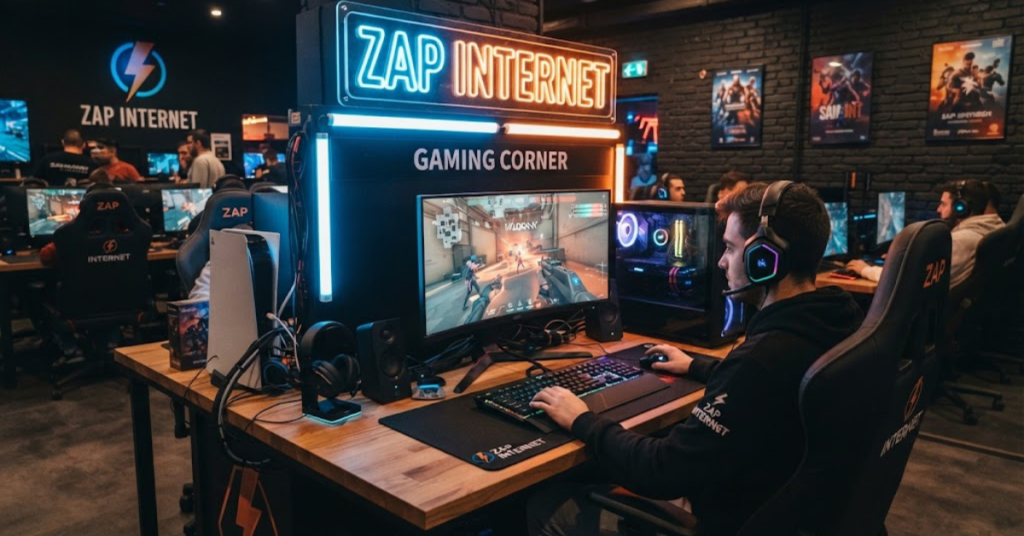
Gaming has become much more than a way to pass the time. For millions of people, it is a hobby, a competitive activity, and a way to connect with friends around the world. This growing interest has made gaming corner zap-internet an interesting search term for people looking to explore gaming spaces, online entertainment, and reliable internet connectivity.
A good gaming experience depends on more than owning an expensive computer or the latest console. The right environment, comfortable equipment, stable internet connection, and suitable games all contribute to an enjoyable experience. Whether you’re a casual player or someone who spends hours competing online, understanding these elements can help you get more out of gaming.
In this guide, we’ll explore gaming corner ideas, internet requirements, gaming equipment, performance improvements, and practical ways to create a better gaming experience.
What Is Gaming Corner Zap-Internet?
The phrase gaming corner zap-internet can be understood as a search term connecting two important parts of modern gaming: a dedicated gaming environment and internet-based entertainment.
A gaming corner is a personal space designed for playing video games. It may include a gaming PC, console, monitor, comfortable chair, headphones, keyboard, mouse, and other accessories.
The internet component is equally important, particularly for multiplayer games, cloud gaming, online communities, and downloading digital games.
Together, these elements represent the foundation of a convenient gaming environment where players can enjoy different types of entertainment.
Why Is a Dedicated Gaming Corner Important?
Having a dedicated gaming area offers several advantages:
- Better organization: Gaming accessories, cables, controllers, and other equipment have designated places.
- Improved comfort: A suitable chair and desk make longer gaming sessions more comfortable.
- Fewer distractions: A separate gaming space can help players concentrate.
- Personal customization: Players can decorate their spaces with lighting, posters, and gaming accessories.
- Convenience: Keeping equipment together makes it easier to start playing.
You don’t need an expensive room or professional equipment. Even a small desk in a bedroom can become a practical gaming corner.
How to Build the Perfect Gaming Corner
Creating a gaming space doesn’t have to be complicated. The best approach is to start with essential equipment and gradually improve your setup.
1. Choose the Right Gaming Desk
Your desk provides the foundation for your entire gaming setup. It should have enough room for your monitor, keyboard, mouse, speakers, and other accessories.
Consider these factors when choosing a desk:
- Sufficient surface area for your equipment.
- Strong construction that supports your monitor and computer.
- Cable management features.
- A comfortable height for sitting.
- Storage space for controllers and accessories.
If you’re working with limited space, a compact desk with built-in shelves can be a practical option.
2. Invest in a Comfortable Gaming Chair
Comfort matters, especially when gaming for extended periods. An adjustable chair with suitable back support can help you maintain a more comfortable sitting position.
Look for features such as:
- Adjustable seat height.
- Supportive backrest.
- Comfortable cushioning.
- Suitable armrest positioning.
- Materials that allow airflow.
Remember that an expensive gaming chair isn’t automatically the best choice. Proper fit and adjustability are more important than appearance.
3. Select the Right Monitor
A monitor affects how clearly and smoothly games appear on your screen.
Some important specifications include:
| Monitor Feature | What It Means |
|---|---|
| Resolution | Determines image sharpness |
| Refresh rate | Measures how frequently the screen updates |
| Response time | Measures how quickly pixels change |
| Screen size | Determines the viewing area |
| Panel type | Influences color, contrast, and viewing angles |
For example, a 144Hz monitor can display up to 144 refreshes per second when supported by the computer and game. This can provide smoother motion than a traditional 60Hz display.
However, the benefits depend on whether your hardware can produce enough frames per second.
4. Add Gaming Accessories
Accessories can make gaming more convenient and enjoyable.
Some useful options include:
- Mechanical or standard gaming keyboards.
- Gaming mice with adjustable sensitivity.
- Headphones with clear audio.
- Mouse pads with enough space for movement.
- Controllers for compatible games.
- Microphones for multiplayer communication.
- Webcam equipment for streaming.
You don’t need to purchase everything immediately. Start with accessories that improve your most frequently played games.
Why Internet Connectivity Matters for Online Gaming
A gaming setup may have excellent hardware, but poor internet connectivity can still create frustrating experiences.
Online games communicate with remote servers to exchange information about player movement, actions, game events, and match progress. When the connection becomes unstable, players may experience lag, disconnections, or delayed responses.
This makes internet quality an important part of the gaming corner zap-internet experience.
Understanding Internet Speed for Gaming
Internet speed is generally measured in megabits per second (Mbps). It describes how quickly data can travel between your device and the internet.
However, download speed alone doesn’t determine gaming performance.
Here are the main factors to understand:
Download speed: Determines how quickly your device receives information. It matters when downloading games, updates, and additional content.
Upload speed: Determines how quickly your device sends information. It is relevant for multiplayer communication, streaming, and sharing gameplay.
Ping: Measures the time it takes for data to travel to a server and back, usually expressed in milliseconds (ms).
Latency: Describes the delay in communication between your device and a server. Lower latency generally means more responsive gameplay.
Jitter: Measures variations in latency. High jitter can make an otherwise fast connection feel inconsistent.
What Internet Speed Is Best for Gaming?
There isn’t one universal internet speed requirement for every game. Most online games use relatively modest amounts of bandwidth during active gameplay, but downloading large games and streaming simultaneously require more capacity.
The following figures are practical planning guidelines rather than universal minimum requirements.
| Internet Speed | Suitable Usage |
|---|---|
| 10–25 Mbps | Basic online gaming for one user |
| 25–50 Mbps | Gaming and everyday internet activities |
| 50–100 Mbps | Gaming, downloads, and moderate streaming |
| 100–300 Mbps | Multiple connected devices and heavier downloads |
| 300+ Mbps | Larger households and demanding internet usage |
For competitive gaming, a stable connection with low latency is often more valuable than simply paying for the highest download speed.
How to Improve Internet Performance for Gaming
If your online games frequently lag or disconnect, a few changes may improve your connection.
Use an Ethernet Connection
An Ethernet cable connects your gaming device directly to your router.
Compared with Wi-Fi, a wired connection can provide:
- More consistent connectivity.
- Reduced interference.
- Lower latency in many home network environments.
- Fewer unexpected wireless disconnections.
For competitive multiplayer games, Ethernet is often the preferred option.
Position Your Wi-Fi Router Properly
If Ethernet isn’t practical, router placement can make a noticeable difference.
Try these simple adjustments:
- Place the router in a central, elevated location.
- Avoid hiding it inside cabinets.
- Keep it away from thick walls and major sources of interference.
- Position your gaming device within a reasonable range.
- Consider a mesh Wi-Fi system if your home has coverage problems.
A modern Wi-Fi 6 or Wi-Fi 7 router may also help in compatible environments, particularly when several devices share the same network.
Reduce Background Internet Usage
Other devices and applications can compete for available bandwidth.
Before starting an important gaming session, consider:
- Pausing large downloads.
- Stopping unnecessary video streams.
- Closing applications that use significant network resources.
- Checking whether other household members are downloading large files.
- Enabling Quality of Service (QoS) settings if your router supports them.
These steps can help reduce network congestion, although QoS settings do not automatically guarantee lower ping.
Best Gaming Equipment for a Modern Gaming Corner
Choosing equipment depends on your budget, gaming preferences, and available space.
Here are the main categories worth considering.
Gaming PC or Console
The first major decision is whether you prefer PC gaming or console gaming.
Gaming PC advantages:
- Greater hardware customization.
- Wide selection of games.
- Support for different input devices.
- Upgrade options for components.
- Flexible graphics and performance settings.
Gaming console advantages:
- Straightforward setup.
- Optimized hardware and software.
- Comfortable living-room gaming.
- Controller-focused gameplay.
- Less need for hardware configuration.
Popular gaming platforms include PlayStation 5, Xbox Series X|S, and gaming PCs.
Gaming Headphones
Audio is an important part of the gaming experience. Good headphones help players hear environmental sounds, communicate with teammates, and enjoy music and sound effects.
Consider:
- Audio clarity.
- Microphone quality.
- Wearing comfort.
- Wired versus wireless connectivity.
- Compatibility with your gaming platform.
Gaming Keyboard and Mouse
PC gamers often benefit from a responsive keyboard and mouse combination.
A gaming mouse with adjustable DPI settings allows users to change cursor sensitivity. A suitable keyboard can also improve comfort and responsiveness.
The ideal combination depends on the type of games you play.
Popular Types of Online Games
Online gaming includes many different genres, each offering a unique experience.
Multiplayer Action Games
These games focus on competition, teamwork, and quick decision-making.
Players may participate in team battles, survival challenges, or large multiplayer matches.
Role-Playing Games (RPGs)
Role-playing games allow players to develop characters, explore virtual environments, complete missions, and interact with other players.
Some RPGs offer extensive online multiplayer features.
Strategy Games
Strategy games involve planning, resource management, and tactical decisions.
They can be played individually or against other players, depending on the game.
Sports and Racing Games
Sports and racing titles recreate competitive activities in digital environments.
Players can compete against friends, participate in online tournaments, and improve their skills over time.
Casual and Social Games
Not everyone wants intense competition. Casual games provide accessible entertainment through puzzles, simulations, card games, and other simple activities.
These games are often suitable for short gaming sessions.
Gaming Corner Setup Ideas for Small Spaces
You don’t need a dedicated gaming room to create an attractive gaming environment.
If your available space is limited, consider these ideas.
Minimalist Gaming Setup
A minimalist setup focuses on essential equipment without unnecessary decorations.
Use a compact desk, one monitor, a wireless keyboard, and a headset stand. Keep cables organized to maintain a clean appearance.
RGB Gaming Setup
RGB lighting adds color and personality to a gaming environment.
You can use LED strips, illuminated keyboards, gaming mice, and monitor lighting to create a coordinated look.
Avoid excessive brightness that causes eye strain or screen reflections.
Budget-Friendly Gaming Setup
A good gaming corner doesn’t have to cost a fortune.
Start with:
- An existing desk.
- A comfortable chair.
- A suitable computer or console.
- A reliable monitor or television.
- Basic headphones.
- Proper cable organization.
Upgrade individual components when your budget allows.
How to Stay Safe While Gaming Online
Online gaming offers opportunities to meet people and build communities, but players should also understand common digital safety risks.
Protect Your Personal Information
Avoid sharing sensitive details such as your home address, passwords, phone number, or financial information with strangers.
Use strong, unique passwords for gaming accounts and enable two-factor authentication whenever available.
Watch Out for Gaming Scams
Some fraudulent websites and individuals advertise free gaming currency, account upgrades, rare items, or exclusive rewards.
Be cautious when encountering offers that:
- Promise unrealistic rewards.
- Request your account password.
- Ask you to download suspicious software.
- Require payment through unusual methods.
- Send you to unfamiliar login pages.
Use official game stores and trusted payment channels whenever possible.
Maintain Healthy Gaming Habits
Gaming should remain an enjoyable activity rather than something that interferes with everyday responsibilities.
Helpful habits include:
- Taking regular breaks.
- Maintaining a comfortable sitting position.
- Getting enough sleep.
- Staying physically active.
- Setting reasonable gaming schedules.
A balanced routine supports both physical comfort and long-term enjoyment.
Is Gaming Corner Zap-Internet Suitable for Beginners?
The gaming corner zap-internet concept can be useful for beginners who want to understand the relationship between gaming equipment, internet connectivity, and online entertainment.
New players don’t need advanced hardware or expensive networking equipment to get started.
A simple approach is to:
- Choose a gaming platform that matches your interests.
- Set up a comfortable gaming area.
- Connect to a reliable internet service.
- Select games that suit your experience level.
- Learn basic online safety practices.
- Upgrade your equipment gradually.
Starting with the essentials makes gaming more affordable and less complicated.
Frequently Asked Questions (FAQs)
1. What is gaming corner zap-internet?
Gaming corner zap-internet is a search phrase associated with gaming spaces and internet-based entertainment. It can be explored as a topic covering gaming setups, online connectivity, gaming accessories, and multiplayer experiences.
2. What do I need to create a gaming corner?
You generally need a gaming PC or console, a monitor or television, a desk, a comfortable chair, and suitable accessories. A reliable internet connection is also important if you plan to play online games.
3. How much internet speed do I need for online gaming?
Many online games work with relatively modest broadband connections. A connection of 25–50 Mbps can be sufficient for basic gaming, while faster plans may be useful for households with multiple users and frequent large downloads.
4. Is Ethernet better than Wi-Fi for gaming?
Ethernet generally provides more consistent connectivity and less interference than Wi-Fi. It is often a better choice for competitive gaming, although modern Wi-Fi connections can also deliver excellent performance.
5. Can I build a gaming corner on a small budget?
Yes. You can start with a basic desk, an existing computer or console, a suitable display, and affordable accessories. Gradually upgrading individual components is a practical way to build a better setup.
6. Does internet speed affect gaming performance?
Yes, but speed isn’t the only factor. Ping, latency, jitter, packet loss, and network stability can have a significant impact on online gameplay.
7. What is the best internet connection for competitive gaming?
A stable broadband connection with low latency and minimal packet loss is ideal. Fiber internet with an Ethernet connection is often an excellent option where available.
8. Is online gaming safe?
Online gaming can be safe when players follow basic cybersecurity practices. Protect your personal information, use strong passwords, enable account security features, and avoid suspicious links and unauthorized downloads.
Conclusion
A great gaming experience starts with the right combination of equipment, comfort, and reliable connectivity. Whether you’re building a dedicated gaming room or upgrading a small desk setup, focusing on practical improvements can make a meaningful difference.
The gaming corner zap-internet topic brings together two important aspects of modern gaming: creating a comfortable gaming environment and maintaining a dependable internet connection. From choosing the right monitor and accessories to improving Wi-Fi performance and protecting online accounts, every detail contributes to a better experience.
Start with the equipment you already have, improve your internet connection where necessary, and upgrade your setup as your interests grow. Explore more gaming guides and technology tips to discover additional ways to make your gaming experience smoother, safer, and more enjoyable.